0 ratings


Item #:
254775344
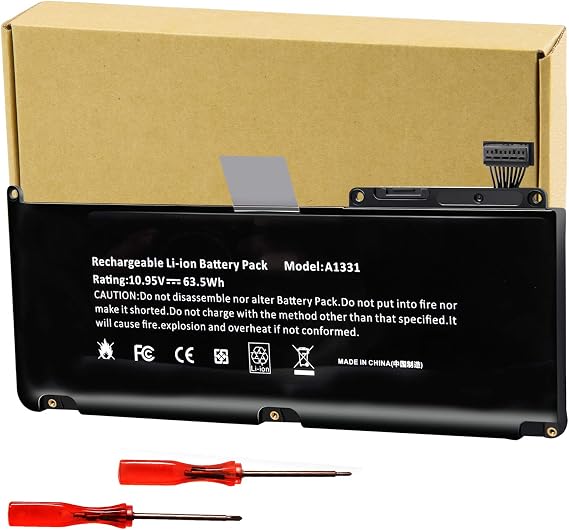
Futurebatt A1331 Battery for Apple MacBook Unibody 13" A1342 Late 2009 / Mid 2010
Item #:
254775344
TOP 114
Price Details
Excluding Shipping & Custom charges ( Shipping and custom charges will be calculated on checkout )
*All items will import from US
0 ratings
Write a review
In stock
 Imported from USA store
QTY:
Order now and get it around Friday, September 25
Secured transaction
Ubuy works hard to protect your security and privacy. Our advanced payment security system ensures confidentiality by encrypting your information during transmission using AES (Advanced Encryption Standards) and SSL (Secure Socket Layer) protocols. Your payment details are 100% secure as we do not share your payment details with third party sellers.
Our Top Logistics Partners


Experience long-lasting power and safety with our upgraded battery featuring multi-protection materials and cutting-edge technology.

Fast
Shipping

Free
Return*

Secure Packaging

100% Original Products

PCI DSS Compliance

ISO 27001 Certified



Note: Step Down Voltage Transformer required for using electronics products of US store (110-120). Recommended power converters Buy Now.


Product Details
| Brand | Futurebatt |
| Model Number | 8560 |
| Model Name | A1331 |
| UPC | 698545917015 |
| Manufacturer | Dongguan LEWE Electronics co., LTD |
| Battery Capacity | 5800 milliamp_hours |
| Voltage | 10.95 volts |
| Reusability | Rechargeable |
| Antenna Location | Laptop |
| Battery Cell Type | Lithium Ion |
| Battery Cell Composition | Lithium Ion |
| Recommended Uses For Product | Laptop |
| Package Weight | 2.53 Pound (1.15 kg) |
Dangerous Goods
To avoid the delay in customs clearance process for Dangerous Goods, the shipment shall be opened at our warehouse facility to check the severity of hazardous components. Please see the list of Dangerous goods here.
Product Description
Futurebatt A1331 Battery for Apple MacBook Unibody 13" A1342 Late 2009 / Mid 2010
Have any Query? Chat with us
Customer Questions & Answers
-
Question:
What are the compatible models for the Futurebatt 7CJRC Laptop Battery?
Answer: The Futurebatt 7CJRC Laptop Battery is specifically designed for Dell Latitude models 7470 and 7270, including E7470 and E7270. This compatibility ensures that the battery fits perfectly in these laptops without any modification. Using the correct battery model is crucial as it helps to avoid potential issues such as overheating or malfunctioning. If you own any of these Dell Latitude models, this battery is an excellent choice to restore your laptop's power capacity. -
Question:
How long can I expect the Futurebatt 7CJRC Laptop Battery to last?
Answer: The longevity of the Futurebatt 7CJRC Laptop Battery depends on various factors such as usage habits, power management settings, and the type of applications in use. Typically, under normal usage conditions, this battery can provide an impressive operating time. Utilizing energy-efficient applications and proper power settings will help maximize the battery's lifespan. Whether you are working on documents, browsing the web, or watching videos, this battery can support your daily tasks effectively. -
Question:
Is the Futurebatt 7CJRC Laptop Battery safe for my Dell laptop?
Answer: Yes, the Futurebatt 7CJRC Laptop Battery is built with high-quality materials and adheres to strict safety standards. It includes built-in protection mechanisms to prevent overcharging, overheating, and short circuits, ensuring the safety of your device. Selecting a battery that meets safety compliance is vital for maintaining the integrity and performance of your laptop. You can confidently use this battery for your Dell Latitude models, knowing that safety is a top priority. -
Question:
Can I replace my laptop battery myself?
Answer: Replacing the Futurebatt 7CJRC Laptop Battery can be done by yourself if you have basic technical skills. First, ensure your laptop is powered off, and disconnect it from any power source. Open the battery compartment, typically located on the bottom of the laptop, and carefully remove the old battery. Insert the new Futurebatt battery, ensuring a snug fit, and secure the compartment back. If you follow the user manual for your laptop, you should be able to perform the task without professional help. -
Question:
What should I do if my laptop doesn’t recognize the new battery?
Answer: If your laptop does not recognize the new Futurebatt 7CJRC Laptop Battery, first check if the battery is installed correctly. Make sure it is firmly seated in the compartment and the connectors are clean. Restarting your laptop can also refresh the system's connection with the battery. Sometimes running a BIOS update can resolve recognition issues. If problems persist, refer to user forums or seek assistance from technical support for further troubleshooting. -
Question:
How does the Futurebatt 7CJRC battery compare to original Dell batteries?
Answer: The Futurebatt 7CJRC Laptop Battery is designed to meet or exceed the performance of original Dell batteries. While original batteries are often more expensive, the Futurebatt battery offers an excellent value with comparable capacity and performance. It features the same voltage and provides reliable power output, ensuring your laptop operates efficiently. Whether you need to complete tasks at work or enjoy multimedia, this battery delivers consistent performance similar to its original counterpart. -
Question:
Do I need to calibrate my Futurebatt 7CJRC Laptop Battery?
Answer: Calibrating your Futurebatt 7CJRC Laptop Battery may enhance its performance and lifespan. To calibrate, fully charge your battery, then discharge it until the laptop shuts down. Afterward, charge it back to 100% without interruption. This process allows your laptop's battery management system to accurately gauge battery capacity. Regular calibration is beneficial, especially if you notice the battery percentage becoming inaccurate over time. This practice helps maintain optimal performance for your laptop. -
Question:
What makes the Futurebatt 7CJRC Laptop Battery a better choice than other brands?
Answer: The Futurebatt 7CJRC Laptop Battery stands out due to its combination of quality, compatibility, and reliability. Manufactured with advanced technologies, it delivers enhanced performance compared to many generic brands. The battery also undergoes rigorous testing to ensure it meets safety and efficiency standards. When choosing a battery, it’s essential to consider factors like durability and customer feedback. Opting for Futurebatt means investing in a battery that is engineered to support your Dell Latitude effectively. -
Question:
Where can I buy the Futurebatt 7CJRC Laptop Battery?
Answer: You can buy the Futurebatt 7CJRC Laptop Battery at Ubuy in Tonga. Ubuy provides a user-friendly platform that allows you to easily access this product, along with customer reviews and detailed product descriptions. Shopping on Ubuy ensures you get the right battery compatible with your Dell Latitude models. Check their website for availability and learn more about your purchase options.
Futurebatt Batteries 8560 Editorial Review
No editorial reviews found
Customer Reviews & Ratings
1 customers ratings
-
5 Star
100%
-
4 Star
0%
-
3 Star
0%
-
2 Star
0%
-
1 Star
0%
Review this product
Share your thoughts with other customers
Platform Trust & Buyer Confidence

JK
Jasmin
Verified buyer
“Great products and very good service: very easy and very fast international delivery.”
9 September 2026 · via Trustpilot
AG
Anke
Verified buyer
“Wonderful online shopping experience, smooth transaction from the start. Payment method works conveniently and delivery is unexpectedly fast and reliable. You go the extra mile for service. What makes this even more amazing, you deliver to Namibia. I will remain a happy Ubuy customer and will increase my purchases for sure! Thank you!”
10 September 2026 · via Trustpilot
H
Hazel
Verified buyer
“Very easy to find the products what you need, and so fast delivery, that’s why I highly recommended to others costumers to used ubuy.”
10 September 2026 · via Trustpilot
O
Opaleye
Verified buyer
“I received exactly what I ordered I was skeptical about your site because that was my first time to order. But the order came timely and neatly packaged. I was not disappointed. Thank you.”
11 September 2026 · via Trustpilot
AC
Adele
Verified buyer
“Easy to find and order what you want on the website. Delivery is quick to the UK”
8 September 2026 · via Trustpilot
Secure Checkout
Global Delivery
Easy Returns
Genuine Products
Product Price History
Important information
- Limitations : For products shipped internationally, please note that any manufacturer warranty may not be valid; manufacturer service options may not be available; product manuals, instructions, and safety warnings may not be in destination country languages; the products (and accompanying materials) may not be designed in accordance with destination country standards, specifications, and labeling requirements; and the products may not conform to destination country voltage and other electrical standards (requiring use of an adapter or converter if appropriate). The recipient is responsible for assuring that the product can be lawfully imported to the destination country. When ordering from Ubuy or its affiliates, the recipient is the importer of record and must comply with all laws and regulations of the destination country.
- Not all the products listed on Ubuy are for sale, as Ubuy is a global search engine. Products are subject to export/trade regulations.
TOP 114
Order now and get it around Friday, September 25
This item is not restrict in my country.(Please click on above link if this item is not restrict in your country, So our team will review and allow.)
QTY:
Secured transaction
PCI DSS compliant and ISO 27001:2022 certified, with encrypted payments and full buyer protection on every order.
Our Top Logistics Partners
Fastest cross-border delivery
Features & Benefits
- Fits 2021 MacBook Pro 16-inch (Model A2485).
- Features upgraded electric core technology for increased energy density.
- Durable construction with operation temperature protection from -10 to 35 degrees Celsius.
- Multiple safety protections: overcharge, overdischarge, and short-circuit.
- 500+ charge cycles ensuring longevity and reliability.
- 30 days refund and 12 months replacement guarantee.
Ubuy Assurance
Experience worry-free shopping with 100% original products, PCI DSS-compliant payment security, ISO 27001-certified data protection, the fastest cross-border delivery, free returns *, and secure packaging on every order.