- Home Page /
- Electronics /
- Computer Accessories /
- Tablet Replacement Parts /
- Screens /
- LMQ for iPad 7/8 (7th 8th Gen) Screen Replace...
0 ratings


Item #:
118357666
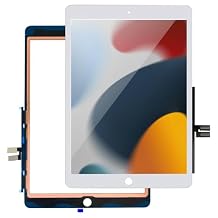
LMQ for iPad 7/8 (7th 8th Gen) Screen Replacement Digitizer 10.2"(A2197,A2198,A2200,A2270,A2428,A2429,A2430) for iPad 7/8 Screen Replacement Parts(NO
87% of respondents would recommend this to a friend
Item #:
118357666
TOP 27
Price Details
Excluding Shipping & Custom charges ( Shipping and custom charges will be calculated on checkout )
*All items will import from US
0 ratings
Write a review
In stock
 Imported from USA store
QTY:
Order now and get it around Friday, October 02
Secured transaction
Ubuy works hard to protect your security and privacy. Our advanced payment security system ensures confidentiality by encrypting your information during transmission using AES (Advanced Encryption Standards) and SSL (Secure Socket Layer) protocols. Your payment details are 100% secure as we do not share your payment details with third party sellers.
Our Top Logistics Partners


Quality is our top priority! All iPad 7/8 screen replacements undergo strict QC tests to ensure perfection.

Fast
Shipping

Free
Return*

Secure Packaging

100% Original Products

PCI DSS Compliance

ISO 27001 Certified



Note: Step Down Voltage Transformer required for using electronics products of US store (110-120). Recommended power converters Buy Now.


What Stands Out
Compatible Models
Designed specifically for iPad 7 and 8 models, this screen replacement ensures a perfect fit and seamless integration, addressing compatibility issues with generic parts and enhancing the user experience.
Pre-Installed Home Button
The included home button is pre-installed, saving time and effort during the repair process, while ensuring functionality and ease of use without the need for technical expertise.
High-Quality Digitzier
Crafted with durable materials, this digitizer replacement not only enhances touch sensitivity but also maintains the device's sleek look, providing excellent value and longevity for your iPad.
Product Details
| Package Dimensions | 11.61 x 8.39 x 0.63 inches (29.5 x 21.3 x 1.6 cm) |
| Item Weight | 7 ounces (198.45 grams) |
| Manufacturer | LMQ |
| Date First Available | February 11, 2025 |
Who Should Buy?

-
DIY Repair Enthusiasts
Those who enjoy repairing their devices will find this product useful for screen replacements.
-
Budget-Conscious Users
Users looking to save money by replacing their iPad screens instead of buying a new device.
-
iPad 7/8 Owners
Individuals with damaged screens on iPad 7 or 8 models can benefit from this tailored replacement part.

-
Non-Tech Savvy Users
Users lacking experience in repairs may struggle with the installation process, risking further damage.
Product Description
LMQ for iPad 7/8 (7th 8th Gen) Screen Replacement Digitizer 10.2"(A2197,A2198,A2200,A2270,A2428,A2429,A2430) for iPad 7/8 Screen Replacement Parts(NO LCD),+Home Button+Pre-Installed White
Have any Query? Chat with us
Customer Questions & Answers
-
Question:
What is the compatibility of the iPad 7th/8th Generation Screen Replacement Digitizer?
Answer: The iPad 7th/8th Generation Screen Replacement Digitizer is compatible with models A2197, A2198, A2200, A2270, A2428, A2429, and A2430. This means it fits the 10.2-inch screen of both the iPad 7 and 8 models perfectly. Ensuring compatibility is crucial when purchasing replacement parts, as it guarantees that the digitizer will function properly with the existing hardware. If you're repairing an iPad from this series with a cracked or unresponsive screen, this digitizer is an excellent choice. -
Question:
How can I replace the screen on my iPad 7/8?
Answer: Replacing the screen on your iPad 7/8 involves several steps, starting with powering off the device and removing the existing screen. You'll need tools like a heat gun, suction cup, and adhesive strips. After carefully detaching the damaged screen, the new digitizer can be aligned and pressed into place. Following the repair, it's essential to test the new screen to ensure touch responsiveness and display quality. DIY repairs can save costs and enhance your skills, making it a rewarding experience for tech-savvy users. -
Question:
What tools are required for installing the iPad screen replacement?
Answer: Installing the iPad screen replacement requires specific tools such as a heat gun or hairdryer to soften the adhesive, a suction cup for lifting the screen, and a screwdriver set to remove screws. Additionally, a plastic spudger can help pry components apart without risking damage. Using the right tools ensures a smoother repair process and minimizes the risk of breaking additional parts. Whether you’re a beginner or experienced, having appropriate tools at hand is vital for a successful installation. -
Question:
What should I check before purchasing the screen replacement?
Answer: Before purchasing the screen replacement for your iPad 7/8, check the model number to ensure compatibility: A2197, A2198, A2200, A2270, A2428, A2429, or A2430. Also, examine the condition of your device, as internal damage can affect the repair. Reading customer reviews and product specifications can provide insight into the quality and reliability of the part. It's crucial to choose a reputable seller to receive a high-quality replacement that meets your needs. -
Question:
What are the signs that my iPad needs a screen replacement?
Answer: Signs that your iPad needs a screen replacement include a cracked or shattered glass, unresponsive touch areas, discoloration or dead pixels, and issues with screen brightness. These problems can significantly hinder the functionality of your device. If you notice any of these symptoms, it's important to consider a replacement. Fixing these issues not only improves usability but also enhances the overall lifespan of the iPad, making it a practical option for users who rely on their devices daily. -
Question:
Is professional installation recommended for the screen replacement?
Answer: While replacing the screen can be a DIY project, professional installation is recommended for those unfamiliar with electronic repairs. Technicians have the experience, tools, and expertise to perform the replacement efficiently and safely, reducing the likelihood of damaging internal components. Furthermore, professional service often includes testing and ensuring that everything is functioning correctly post-repair. If you're uncertain about the process or lack the necessary tools, seeking a professional is a wise choice. -
Question:
Can I buy the iPad 7/8 screen replacement digitizer online?
Answer: Yes, the iPad 7/8 screen replacement digitizer can be purchased online. One of the recommended platforms to buy this product is Ubuy, which offers a range of options, ensuring you find the right fit for your iPad model. Shopping online provides the convenience of comparing different products, reading user reviews, and accessing detailed descriptions to make an informed decision. This can save you both time and effort compared to traditional retail shopping. -
Question:
What safety precautions should I take during the replacement?
Answer: When replacing your iPad screen, safety precautions are essential. Always power down your device to prevent any electrical damage. Use a clean, static-free workspace and consider wearing an anti-static wrist strap to avoid static discharge. Be cautious with tools to prevent injury and take your time with each step to avoid damaging internal components. Proper care during the replacement process will ensure a successful repair and preserve the integrity of your device. -
Question:
How do I test if my new iPad screen replacement is working?
Answer: After installing the new iPad screen replacement, testing is crucial to ensure it works correctly. Power on your iPad and check for display clarity, touch responsiveness, and the ability to interact with apps. Swipe, pinch, and zoom gestures should function smoothly. If the screen remains unresponsive or displays issues, recheck the connections inside and ensure that the digitizer is properly seated. Adequate testing verifies a successful installation and ensures the device operates as intended. -
Question:
What are the benefits of DIY screen replacement for my iPad?
Answer: DIY screen replacement can be highly beneficial as it saves money on repair costs and allows for a rewarding hands-on experience. It enables users to understand their device better and equips them with technical skills for future repairs. Furthermore, successfully completing a DIY repair can enhance your confidence in handling electronics. For tech enthusiasts or those willing to learn, this process can provide a sense of achievement aside from simply fixing a damaged screen.
LMQ Screens Editorial Review
The iPad 7th and 8th Generation screen replacement digitizer solution has received a mixed reception from customers, indicating a diverse range of experiences among users. On one hand, many users praised the digitizer for its compatibility and quality resembling that of the original factory components. Several customers noted that with appropriate technical knowledge and careful handling, the installation process can be completed relatively smoothly, often enhancing the performance of their devices significantly post-replacement. Positive remarks frequently centered around the ease of operation and the successful restoration of functionality to the iPad, particularly for users who took their time during installation. The inclusion of tools and adhesive tape was also mentioned favorably, contributing to a commendable overall value for the product. Many users expressed satisfaction with the clarity and responsiveness of their screens after installation, likening them to OEM standards, which was a highlight for most. However, not all experiences were as seamless. A segment of customers encountered challenges concerning installation difficulties, issues with fit, and the operational reliability of the screens. Reports of inConsistent touch response and flimsy home button quality raised concerns, as did instances where the replacement products did not function correctly upon installation. Some users emphasized the necessity of additional adhesive for secure installation, which could be a discouragement for those unsure about their technical skills. In summary, while this replacement digitizer is celebrated for its potential to revitalize devices when installed carefully, some Consumers faced hurdles that could diminish overall satisfaction. **
Customer Reviews & Ratings
1 customers ratings
-
5 Star
100%
-
4 Star
0%
-
3 Star
0%
-
2 Star
0%
-
1 Star
0%
Review this product
Share your thoughts with other customers
Pros
- High compatibility with OEM parts.
- Restores device functionality effectively.
- Clear screen quality with no yellow tint.
- Good value for the price.
- Includes adhesive and tools for installation.
Cons
- Installation can be challenging, requiring technical knowledge.
Platform Trust & Buyer Confidence

JK
Jasmin
Verified buyer
“Great products and very good service: very easy and very fast international delivery.”
9 September 2026 · via Trustpilot
AG
Anke
Verified buyer
“Wonderful online shopping experience, smooth transaction from the start. Payment method works conveniently and delivery is unexpectedly fast and reliable. You go the extra mile for service. What makes this even more amazing, you deliver to Namibia. I will remain a happy Ubuy customer and will increase my purchases for sure! Thank you!”
10 September 2026 · via Trustpilot
H
Hazel
Verified buyer
“Very easy to find the products what you need, and so fast delivery, that’s why I highly recommended to others costumers to used ubuy.”
10 September 2026 · via Trustpilot
O
Opaleye
Verified buyer
“I received exactly what I ordered I was skeptical about your site because that was my first time to order. But the order came timely and neatly packaged. I was not disappointed. Thank you.”
11 September 2026 · via Trustpilot
AC
Adele
Verified buyer
“Easy to find and order what you want on the website. Delivery is quick to the UK”
8 September 2026 · via Trustpilot
Secure Checkout
Global Delivery
Easy Returns
Genuine Products
Product Price History
Important information
- Limitations : For products shipped internationally, please note that any manufacturer warranty may not be valid; manufacturer service options may not be available; product manuals, instructions, and safety warnings may not be in destination country languages; the products (and accompanying materials) may not be designed in accordance with destination country standards, specifications, and labeling requirements; and the products may not conform to destination country voltage and other electrical standards (requiring use of an adapter or converter if appropriate). The recipient is responsible for assuring that the product can be lawfully imported to the destination country. When ordering from Ubuy or its affiliates, the recipient is the importer of record and must comply with all laws and regulations of the destination country.
- Not all the products listed on Ubuy are for sale, as Ubuy is a global search engine. Products are subject to export/trade regulations.
TOP 27
Order now and get it around Friday, October 02
This item is not restrict in my country.(Please click on above link if this item is not restrict in your country, So our team will review and allow.)
QTY:
Secured transaction
PCI DSS compliant and ISO 27001:2022 certified, with encrypted payments and full buyer protection on every order.
Our Top Logistics Partners
Fastest cross-border delivery
Features & Benefits
- High-quality touch screen replacement for iPad 7th and 8th Gen.
- Includes only the touch-sensitive glass layer—no LCD display.
- Compatible with specific iPad models (A2197, A2198, A2200, A2270, A2428, A2429, A2430).
- Pre-installed home button included; transfer original for TouchID functionality.
- Undergoes two rounds of strict quality control testing.
- Ideal for DIY repairs; recommended to watch repair videos before installation.
Ubuy Assurance
Experience worry-free shopping with 100% original products, PCI DSS-compliant payment security, ISO 27001-certified data protection, the fastest cross-border delivery, free returns *, and secure packaging on every order.